Every project / Techy
🟩 Matrix Rain
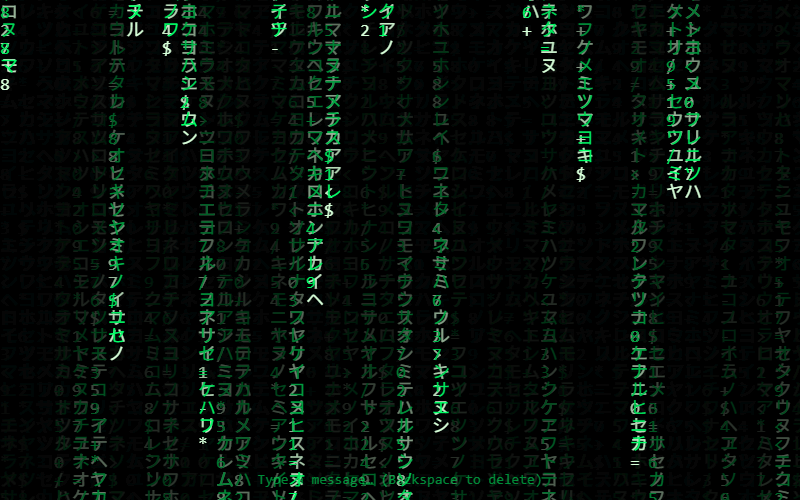
The famous falling green code. Type a message and watch it hide in the rain.
- Language
- HTML, CSS & JavaScript
- Level
- Beginner
- Category
- Techy
What you'll learn
- Canvas text
- Arrays as columns
- Randomness
- Keyboard input
- Unicode characters
How it works
- The screen is split into columns. drops[i] is how far column i has fallen.
- Every 50 ms, each column draws a random character and moves down a row.
- A see-through black rectangle painted over everything makes older characters fade into trails.
- Columns restart at the top at random moments, which keeps the rain uneven.
Knobs to turn
These settings are near the top of the code. Remix it, change one, and watch what happens. The preview updates as you type.
| Setting | Starts at | File | What it does |
|---|---|---|---|
FONT_SIZE | 18 | rain.js | character size (also sets how many columns) |
COLOR | '#00ff66' | rain.js | color of the trails |
Files
| File | Lines | |
|---|---|---|
index.html | 23 | the page: what shows up |
rain.js | 56 | what it does |
Challenges
Each one is a bit harder than the last. Teachers: these make good assignment instructions.
- Change the color from green to your favorite color.
- Use different characters, like emoji or your name's letters.
- Make the rain fall faster when you hold the space bar.
- Make each column a different shade, like a rainbow.
- Make the rain avoid the mouse, parting around it.